> ## Documentation Index
> Fetch the complete documentation index at: https://docs.azguard.my.id/llms.txt
> Use this file to discover all available pages before exploring further.
# Discord Manual
> Boost up your games by using our Discord Bot
**Prerequisites**:
* AzarineGuard subscription with API Key
* Invited our official [Discord Bot](https://azguard.my.id/invite-bot) on your server
* Linked Discord ID on [Central Settings](https://central.azguard.my.id/settings/)
## Setup Steps
Follow these steps to configure and run AzarineGuard on your Discord Server.
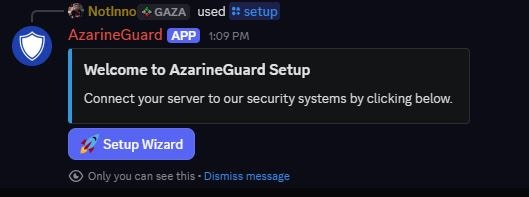 ```bash theme={null}
/setup
```
Enter your **API Key**, **Manager Role**, and **Primary Color** (Hex Code `#0000FF`).
```bash theme={null}
/setup
```
Enter your **API Key**, **Manager Role**, and **Primary Color** (Hex Code `#0000FF`).
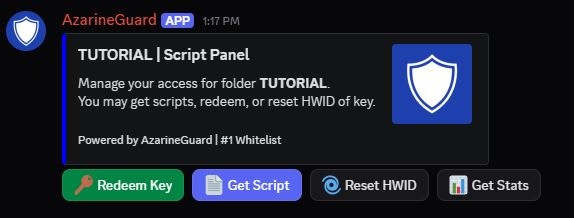 ```md theme={null}
/panel
```
`channel`: Target Discord Channel
```md theme={null}
/panel
```
`channel`: Target Discord Channel
`folder`: Target Folder Name
`buyer_role`: Users Whitelisted Role
Send a panel for users to manage their scripts.
Congratulations, you have successfully integrated AzarineGuard to your Discord Server!
## User Commands
These commands may be used by regular users, setup must be done beforehand.
```bash theme={null}
/ping
```
Responds with the bot latency, used to check Bot Status.
```bash theme={null}
/help
```
Responds with commands list (AzarineGuard Documentation).
```md theme={null}
/getscript
```
*`script_name`: Target Script Name*
Responds with script loader with user key.
```md theme={null}
/redeem
```
*`key`: Target Key*
Redeem a key to their discord account.
```md theme={null}
/resethwid
```
*`folder`: Target Folder Name*
Reset user HWID, only 1x per 24 hour.
```md theme={null}
/getstats
```
*`target`: Target Discord User / Key*
*`folder`: Target Folder Name*
Get user stats, user can only search up their own.
## Manager Commands
These commands may be used by managers, setup must be done beforehand.
```md theme={null}
/panel
```
*`channel`: Target Discord Channel*
*`folder`: Target Folder Name*
*`buyer_role`: Users Whitelisted Role*
Send a panel for users to manage their scripts.
```md theme={null}
/getstats
```
*`target`: Target Discord User / Key*
*`folder`: Target Folder Name*
Get user stats, managers may lookup other users.
```md theme={null}
/whitelist
```
*`user`: Target Discord User*
*`folder`: Target Folder Name*
*`days`: Target Days (-1 for Lifetime)*
Generate a key under a Discord User for a specific Folder.
```md theme={null}
/unwhitelist
```
*`user`: Target Discord User*
*`folder`: Target Folder Name*
Delete a key under a Discord User for a specific Folder.
```md theme={null}
/bulkwhitelist
```
*`role`: Target Discord Role*
*`folder`: Target Folder Name*
*`days`: Target Days (-1 for Lifetime)*
Generate keys for members of a Discord Role for a Folder.
```md theme={null}
/bulkunwhitelist
```
*`role`: Target Discord Role*
*`folder`: Target Folder Name*
Delete keys for members of a Discord Role for a Folder.
```md theme={null}
/bulkkey
```
*`count`: Keys Generation Count*
*`folder`: Target Folder Name*
*`days`: Target Days (-1 for Lifetime)*
Generate keys for a Folder and export it to TXT.
## Troubleshooting
This may be possible due to the Discord Bot being down, check [Status Page](https://status.azguard.my.id/)
If not, resend your panel through the [command](#send-panel) (for managers only).
If the issue can't be resolved by yourself, contact [Support](https://discord.azguard.my.id/) immediately!
This may be possible due to the Discord Bot being down, check [Status Page](https://status.azguard.my.id/)
If the issue can't be resolved, contact [Support](https://discord.azguard.my.id/) immediately!