

Prerequisites:
- AzarineGuard subscription with API Key
- Invited our official Discord Bot on your server
- Linked Discord ID on Central Settings
Setup Steps
Follow these steps to configure and run AzarineGuard on your Discord Server.1
Run Setup Wizzard
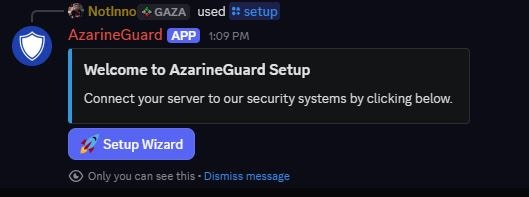
#0000FF).2
Send Panel
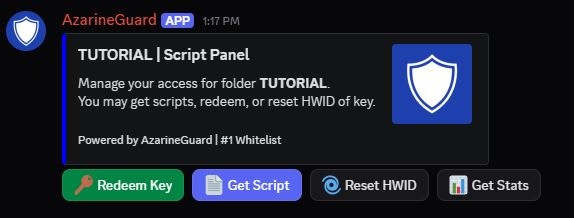
channel: Target Discord Channel folder: Target Folder Name buyer_role: Users Whitelisted Role Send a panel for users to manage their scripts.
User Commands
These commands may be used by regular users, setup must be done beforehand.Ping Bot
Ping Bot
Help Commands
Help Commands
Get Script
Get Script
script_name: Target Script NameResponds with script loader with user key.
Redeem Key
Redeem Key
key: Target KeyRedeem a key to their discord account.
Reset HWID
Reset HWID
folder: Target Folder NameReset user HWID, only 1x per 24 hour.
Get Statistics
Get Statistics
target: Target Discord User / Keyfolder: Target Folder NameGet user stats, user can only search up their own.
Manager Commands
These commands may be used by managers, setup must be done beforehand.Send Panel
Send Panel
channel: Target Discord Channelfolder: Target Folder Namebuyer_role: Users Whitelisted RoleSend a panel for users to manage their scripts.
Get Statistics
Get Statistics
target: Target Discord User / Keyfolder: Target Folder NameGet user stats, managers may lookup other users.
Whitelist User
Whitelist User
user: Target Discord Userfolder: Target Folder Namedays: Target Days (-1 for Lifetime)Generate a key under a Discord User for a specific Folder.
Unwhitelist User
Unwhitelist User
user: Target Discord Userfolder: Target Folder NameDelete a key under a Discord User for a specific Folder.
Whitelist Role
Whitelist Role
role: Target Discord Rolefolder: Target Folder Namedays: Target Days (-1 for Lifetime)
Generate keys for members of a Discord Role for a Folder.Unwhitelist Role
Unwhitelist Role
role: Target Discord Rolefolder: Target Folder NameDelete keys for members of a Discord Role for a Folder.
Generate Keys
Generate Keys
count: Keys Generation Countfolder: Target Folder Namedays: Target Days (-1 for Lifetime)Generate keys for a Folder and export it to TXT.
Troubleshooting
Panel Error: This interaction failed
Panel Error: This interaction failed
This may be possible due to the Discord Bot being down, check Status Page
If not, resend your panel through the command (for managers only).If the issue can’t be resolved by yourself, contact Support immediately!
If not, resend your panel through the command (for managers only).If the issue can’t be resolved by yourself, contact Support immediately!
Command Error: Stuck on AzarineGuard is thinking
Command Error: Stuck on AzarineGuard is thinking
This may be possible due to the Discord Bot being down, check Status Page
If the issue can’t be resolved, contact Support immediately!
If the issue can’t be resolved, contact Support immediately!